The Neo’s Promise
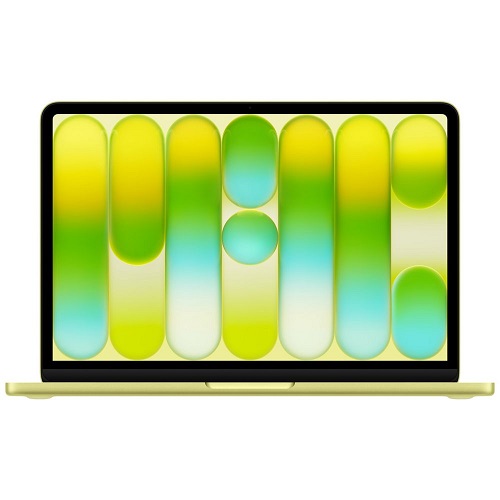
Apple finally gave the budget‑conscious a Mac. The MacBook Neo, a 13‑inch, fanless laptop priced at $599, runs the same A18 Pro silicon that powers the iPhone 16 Pro. It’s a solid performer for web browsing, video calls and even occasional video edits, all wrapped in a sleek aluminum shell and a 500‑nit Liquid Retina screen. Apple markets it as the “best laptop in its price range,” and for many students and casual users that claim holds water.
But the Neo arrives with a 20W USB‑C power brick (except in the UK and EU, where Apple ships it charger‑less). Apple’s spec sheet calls the machine “not fast‑charge capable,” a line that feels like a polite way of saying, “Don’t expect miracles.” Still, the real world tells a different story.
The Charger Lab Test
ChargerLAB put the Neo through a quick charge‑speed test. With the stock 20W adapter, the laptop tops out at about 18 W of input. Swap in Apple’s 35W Dual‑USB‑C Port Compact Power Adapter, $69 on Apple.com and the Neo drinks 30W. The difference translates to roughly a 20‑30‑minute shave off a full charge, a noticeable gain when you’re racing between classes or meetings.
Apple’s higher‑wattage offerings, 96W and 140W GaN bricks, don’t push the Neo any harder. The laptop’s internal charging circuitry caps at about 30 W, so those pricey chargers are essentially overkill.
What It Means for Buyers
- If you stay in Apple’s ecosystem: Grab the 35W adapter. It’s the sweet spot, fast enough without the premium price tag of the 96W or 140W models.
- If you’re willing to look elsewhere: Third‑party 30W‑plus chargers from brands like Campad Electronics hit the same 28‑30W ceiling for less cash.
- If you’re a purist: The Neo’s 20W brick will get the job done; you’ll just wait a bit longer.
The Bigger Picture
Apple’s decision to label the Neo “not fast‑charge capable” is more marketing than hardware. The device can accept higher wattage; it’s just not advertised. That aligns with Apple’s broader strategy of tiered performance: the entry‑level Mac gets a modest charge rate, while the Pro line drinks 96W or more without complaint.
Tim Cook’s brag about “the best launch week ever” is backed by solid sales numbers, but the Neo’s real win is its price‑to‑performance ratio. It’s a Mac that feels premium, runs a flagship chip and, if you pick the right charger, doesn’t leave you tethered to a wall for hours.
Bottom Line
The fastest Apple charger you can buy for the MacBook Neo is the 35 W Dual‑USB‑C adapter. Anything above that is a vanity purchase. Pair it with the Neo’s A18 Pro power and you’ve got a surprisingly capable, budget‑friendly Mac that charges quickly enough for most real‑world use cases.
FAQs
Is the Neo really not fast‑charge capable, or is Apple just being coy?
It’s a PR line. The board will sip up to ~30W if you feed it, but Apple won’t brag about it because the entry‑level narrative is “budget, not premium.”
What charger should I actually buy for a usable charge time?
The 35W Dual‑USB‑C Compact Power Adapter. Anything lower drags you through a slow‑mo charge; anything higher is a vanity spend.
Do the 96W or 140W GaN bricks do any good?
No. The Neo caps at ~30W regardless of the wall‑wart you plug in. Those bricks are for the Pro line, not the Neo. They will charge your Neo but not any faster.
Can I cheat the system with a third‑party charger?
Yes. A decent 30W‑plus USB‑C charger (Campad, Anker, etc.) hits the same ceiling for less cash. Just avoid the cheap, under‑spec 18W bricks.
How much time do I actually save with the 35W adapter versus the stock 20W?
Roughly 20‑30 minutes on a full charge, enough to make a difference between “late for class” and “on time for the meeting.”
Does the Neo’s A18 Pro chip justify the $599 price tag?
For web browsing, video calls and occasional 1080p edits, absolutely. It’s a flagship silicon die in a budget chassis, which is the sweet spot Apple finally hit.
Is the 500‑nit Liquid Retina screen a gimmick at this price?
No. It’s a genuine Retina panel, bright enough for indoor work, color‑accurate enough for casual photo tweaks and still a step up from the typical budget laptop display.
Will the Neo’s fanless design throttle under load?
It will modestly throttle during sustained heavy workloads, but the A18 Pro’s efficiency keeps it usable for most “real‑world” tasks without overheating.
Should I buy the Neo if I’m already deep in the Apple ecosystem?
Yes, grab the 35W adapter, enjoy the seamless hand‑off and you’ll have a Mac that feels premium without breaking the bank.
Is the Neo a good long‑term investment or will it become obsolete quickly?
Apple’s silicon roadmap means the A18 Pro will get software updates for years. It’s a solid entry point that won’t feel ancient in three‑plus years.